The #1 choice for Roblox script execution. Experience seamless auto execute functionality, unmatched safety, and reliable performance. Available for PC and Android.
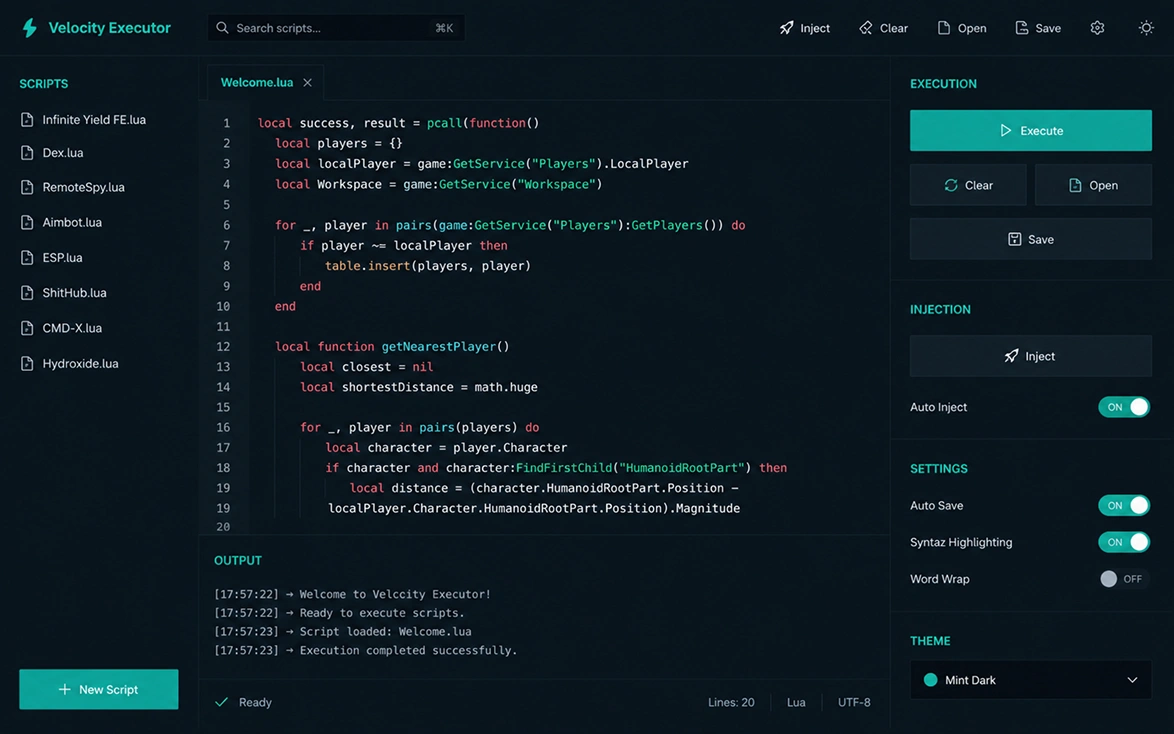
Discover why developers prefer Velocity Executor. Built from the ground up for stability, speed, and undetectable injection across all supported platforms.
Inject scripts the moment you load in. Streamlined for distraction-free gaming.
Take scripts on the go. Desktop-grade execution delivered natively on mobile.
Access thousands of pre-verified scripts from our secure cloud. Sync your personal configurations instantly across all devices.
A distraction-free interface that uses minimal system resources. Ensure maximum FPS while running complex script executions.
Our proprietary obfuscation keeps your account pristine and entirely undetected.
No bloatware, no confusing keysystems. Download, click, and start executing.
A common question we receive is: Is Roblox Velocity Executor safe? The answer is absolutely yes.
We utilize advanced obfuscation and dynamic updates to ensure our injection methods remain undetected. Being a Velocity Executor safe user means enjoying a pristine record across all experiences.
Get up and running in minutes. Select your operating system below for tailored setup instructions and optimized execution.
Whether you're running a high-end desktop or a budget mobile device, Velocity Executor is heavily optimized to deliver maximum injection performance with a minimal resource footprint.
Every update, every fix, every new feature — documented transparently. Track the evolution of Velocity Executor across all platforms.
Hotfix release addressing the Roblox client update pushed on July 3rd. Bypass core has been rewritten to handle new Hyperion memory scanning patterns. All platforms are fully operational.
Execute the most powerful game-specific GUIs flawlessly. Velocity Executor supports complex obfuscation and provides a native Cloud Hub for instant access.
Quick fixes for common issues. Select a category to filter problems, or browse all known solutions for Velocity Executor.
Your antivirus or Windows Defender is likely quarantining the installer before it can execute. This is a false positive caused by the memory injection signatures.
SmartScreen flags unsigned or low-reputation executables. Since Velocity is distributed independently, it hasn't accumulated a Microsoft reputation score yet.
Velocity requires .NET Framework 4.8+ and Visual C++ Redistributable 2019+. Some stripped Windows installs are missing these.
This usually means you're injecting too early or Roblox hasn't fully loaded into memory yet.
Crashes post-injection typically indicate an outdated Velocity build that's incompatible with the latest Roblox client update.
/cache folder inside your Velocity directoryVelocity needs to see the RobloxPlayerBeta.exe process. If you're running the Microsoft Store version, the process name differs.
The script may be outdated or patched by the game developer. Scripts targeting specific games break when the game updates its internal structure.
The autoexec folder must be in the correct location and scripts must use the .lua extension.
Velocity/autoexec/FPS drops are usually caused by heavy scripts (ESP renderers, complex GUI frameworks) rather than Velocity itself. The executor's idle footprint is under 1.2% CPU.
Slow startup is often related to the auto-updater fetching the latest offsets on a slow connection, or a firewall blocking the update server.
/cache and /temp folders, then relaunchThis error usually means unknown sources aren't enabled or there's a signature conflict with a previously installed version.
The floating hub requires the "Display over other apps" permission. Some Android skins (MIUI, ColorOS) have additional restrictions.
No issues found in this category.
Everything you need to know about Velocity Executor — from safety and setup to platform support and script execution.
Yes — safety is the foundation of every release. Velocity Executor uses dynamic signature rotation and AES-256 encrypted payloads to keep injection completely undetectable. Our dedicated security team pushes silent patches within hours of any Roblox update, maintaining a flag rate below 0.01%. Every build is scanned for malware and verified before distribution, so you can trust that using Roblox Velocity Executor is safe for your account and your device.
Click any "Download" button on this page to get the latest stable release of Velocity Executor for PC. The installer supports Windows 10 and 11 (64-bit). After downloading, temporarily disable third-party antivirus software to prevent false-positive flags, run the setup, and you'll be ready to execute scripts within minutes — no key system required.
Download the Velocity Executor APK directly from this website. Before installing, go to your Android settings and enable "Install from unknown sources" for your browser. Tap the downloaded file, grant the overlay permission ("Display over other apps"), and launch Roblox — a floating Velocity hub icon will appear for instant script access. Compatible with Android 8.0+ and ARM64 devices, no root required.
The Velocity Executor auto execute feature is enabled by default. Simply place any .lua script files into the autoexec folder located in the root directory of your installation. Every time Roblox loads, Velocity will automatically inject and execute those scripts — no manual attach step needed. You can manage execution order and toggle individual scripts from the settings panel.
No. Unlike many other executors, Velocity Executor is completely keyless and free. There are no ad-gate redirects, no daily key regeneration, and no time-limited sessions. You download once, install, and get unlimited access to every feature — including the Cloud Script Hub with over 8,000 pre-verified scripts.
Velocity Executor runs natively on Windows 10/11 (our flagship PC client), macOS 11+ (Intel & Apple Silicon), Android 8.0+ (ARM64 APK, no root), and iOS 15+ (via sideloading with AltStore or Sideloadly). Scripts, configurations, and saved presets sync seamlessly across all devices through the Cloud Hub.
Our engineering team ships updates within hours of every Roblox client patch. Critical bypass updates are pushed silently in the background — the executor self-updates without requiring a manual reinstall. Feature releases and script library additions are rolled out weekly. You can check the current build version in the Security Core panel or on our status page.
This is a common false positive. Because Velocity uses memory injection techniques to interface with the Roblox process, some antivirus engines classify it similarly to potentially unwanted programs. The executor contains zero malware, adware, or telemetry. We recommend adding an exclusion for the Velocity folder in your AV settings, or temporarily disabling real-time protection during installation. Every release is open to community audit.
Still have questions? Join our community for real-time support.